A free virtual queueing solution
Streamline your business with a free virtual queue solution. Quick setup, real-time tracking, and link-sharing for efficient customer management.
Article Contents

Nobody likes standing in line. Your customers would rather browse the craft fair, grab coffee, or keep their kids entertained — not hover anxiously at your booth wondering if they missed their turn.
That's the problem virtual queues solve. Instead of a physical line, customers get a number and check their phone to see when they're up. Simple.
The enterprise solutions for this cost thousands per year. But if you just need the basics — a "now serving" number that customers can check from anywhere — you can set one up for free in about five minutes.
How We've Seen This Used
Rabbit Whole Studio, a face-painting service at fairs and festivals, ran into a common problem: they can only paint one kid at a time, but families don't want to stand around waiting for 45 minutes.
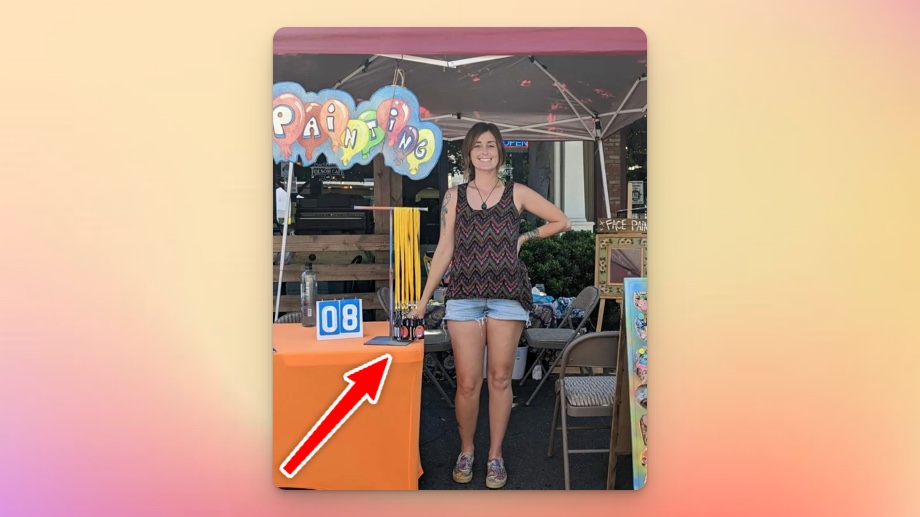
Their solution was clever. Each customer gets a lanyard with their queue number and a QR code. Scan the code, and you see the current "now serving" number on your phone. If you're #23 and they're serving #18, you've got time to hit the food trucks.
The families loved it. They could wander the fair and keep an eye on their position without missing their turn.
Setting This Up Yourself
Here's the actual process:
-
Create a leaderboard with a single entry called "Now Serving" (or whatever label makes sense for your business)
-
Set the layout to "Grid" — this gives you a clean, compact display that works well on phones
-
Go to SHARE and copy the presentation link. You can also generate a QR code right there
-
Print that QR code on receipts, cards, or signs. Customers scan it to see the current number
-
When you finish with a customer, update the number. That's it — everyone watching sees the change instantly

The whole thing runs in a browser. No app for customers to download, no special hardware needed. You update it from your phone while you work.
A Few Things to Consider
This works best when your service time is somewhat predictable. If each customer takes roughly the same amount of time, people can estimate their wait. If one customer might take 5 minutes and another might take an hour, the queue number alone won't tell them much.
You'll also want a backup plan for when your phone dies or the internet hiccups. Even just a whiteboard with the current number covers you.
And some customers won't want to use their phones. That's fine — they can still see the number on your screen or ask you directly. Don't force everyone into the digital system.
Beyond the Basics
If you're running multiple service points, create separate queues for each one. A hair salon might have one queue for cuts and another for coloring, each with its own "now serving" display.
For high-traffic situations, put the display on a visible screen. A tablet mounted near your booth lets everyone see the current number without checking their phones.
The point isn't to build a complicated system. It's to let your customers stop standing around. Everything else is optional.

Written by Caspar von Wrede
Founder of Leaderboarded. Building tools that help teams track progress and stay motivated.
