What is an online leaderboard maker?
An online leaderboard maker is a web-based tool that lets you create, customize, and share ranked leaderboards without coding. You add participants, enter scores, and the tool handles sorting, ranking, and display automatically.
Before dedicated leaderboard tools existed, people used spreadsheets, whiteboards, or custom-coded solutions. These work but each has significant limitations: spreadsheets are hard to share attractively, whiteboards don't update remotely, and custom code requires a developer to build and maintain.
An online leaderboard maker fills the gap. It gives non-technical users a way to create professional, shareable leaderboards in minutes—with real-time updates, visual customization, and sharing built in.
For background on what leaderboards are and how scoring works, see our guide: What is a leaderboard?
How it works
Most online leaderboard makers follow the same general workflow:
- Create a leaderboard Choose a leaderboard type (point-based, multi-column, time-based) and give it a name.
- Add participants Enter participant names manually or import from a spreadsheet.
- Enter scores Update scores through the web interface, sync from Google Sheets, or push scores programmatically via API. The leaderboard re-ranks automatically.
- Customize the design Apply themes, colors, and branding. Add your logo, choose column labels, and configure what information is visible.
- Share Get a shareable link, embed the leaderboard on a website, or display it full-screen on a TV or projector. Updates appear in real time.
Key features to look for
Not all leaderboard makers are equal. Here are the features that matter most when evaluating a tool:
Real-time updates
Scores and rankings should update instantly when changes are made, without requiring viewers to refresh.
Sharing options
Shareable links, website embeds, and full-screen TV display mode. The leaderboard should be viewable anywhere.
Customization
Themes, colors, logos, and layout options so the leaderboard fits your brand and context.
Data import
Import participants and scores from spreadsheets (CSV, Google Sheets, Excel) instead of entering everything manually.
API access
A REST API for updating scores programmatically. Essential for automated leaderboards connected to other systems.
Who uses online leaderboard makers?
The user base is broader than you might expect. Leaderboard makers are used by:
Sales teams
Sales managers create leaderboards to track deals closed, calls made, and revenue generated. The leaderboard is displayed on an office TV or shared in a Slack channel to keep the team motivated. Weekly or monthly competitions with prizes are common.

Teachers and schools
Classroom leaderboards gamify learning: homework points, reading challenges, behavior rewards, quiz scores. Teachers share the leaderboard on the classroom projector or send a link to parents. It works with Chromebooks, iPads, and any device with a browser.

Fitness and wellness organizers
Step challenges, weight loss competitions, gym challenges, and corporate wellness programs use leaderboards to track participation and progress. Participants log activity, and the leaderboard provides accountability and friendly competition.

Event organizers
Hackathons, trivia nights, sports tournaments, and esports competitions need live standings. An online leaderboard maker provides real-time results that spectators and participants can follow on their phones.
Streamers and content creators
Twitch streamers and YouTubers display leaderboards as OBS overlays to track subscriber challenges, viewer competitions, or donation goals during live streams.
Nonprofits and fundraisers
Fundraising campaigns use leaderboards to show top donors, team progress, or overall campaign progress toward a goal. The social proof of a visible leaderboard encourages additional donations.
Leaderboard maker vs. spreadsheet
Spreadsheets are the most common DIY alternative. Here's how they compare:
| Capability | Leaderboard maker | Spreadsheet |
|---|---|---|
| Auto-ranking | ✓ Automatic | Requires formulas |
| Shareable public link | ✓ Built-in | Publish-to-web (limited) |
| Real-time updates | ✓ Instant | Delayed / manual refresh |
| Visual themes | ✓ Multiple themes | ✗ Basic formatting |
| Website embed | ✓ Embed code | Limited / ugly |
| TV display mode | ✓ Full-screen | ✗ Not designed for it |
| API integration | ✓ REST API | Apps Script (complex) |
| Setup time | 2 minutes | 30+ minutes (with formulas) |
Spreadsheets are fine for internal tracking among a few people. When you need to share results publicly, display them on a screen, or let participants interact with the leaderboard, a dedicated tool is the better choice. For a deeper look at the spreadsheet approach, see our guides to building a leaderboard in Google Sheets and Microsoft Excel.
If you already have data in Google Sheets, some leaderboard makers (including Leaderboarded) let you connect your spreadsheet directly so you keep editing in Sheets while the leaderboard handles the display.
Why choose Leaderboarded
Leaderboarded is an online leaderboard maker built specifically for the use cases described above. It gives non-technical users a fast way to create, customize, and share ranked leaderboards—with real-time updates, professional design, and flexible sharing built in.
What Leaderboarded is used for
Leaderboarded covers the full spectrum of online leaderboard use cases:
- Sales competitions. Track deals closed, calls made, revenue booked, or any sales metric. Run weekly, monthly, or quarterly contests with live standings visible to the whole team.
- Classroom gamification. Award points for homework, reading challenges, quiz scores, or behavior. Works on Chromebooks, iPads, and any device with a browser.
- Fitness and wellness challenges. Step challenges, weight-loss programs, gym competitions, and corporate wellness initiatives with participants logging their own activity.
- Events and tournaments. Hackathons, trivia nights, sports tournaments, esports competitions—anywhere you need live standings on a TV, projector, or phone screen.
- Fundraising campaigns. Show top donors, team progress, or overall campaign progress toward a goal, with the social proof that drives additional giving.
- Live streams. OBS browser source support makes it easy to overlay a live leaderboard on Twitch or YouTube streams for subscriber challenges or viewer competitions.
Who uses Leaderboarded
Leaderboarded is used by a wide range of teams and organizations:
- Sales managers and revenue ops running team performance competitions.
- Teachers and school administrators gamifying classrooms and running reading programs.
- HR and wellness coordinators running corporate fitness and engagement challenges.
- Event organizers managing tournaments, hackathons, trivia nights, and conferences.
- Nonprofits and fundraisers tracking donations and campaign progress.
- Streamers and content creators building interactive audiences around live leaderboards.
- Developers and product teams using the API to build gamification into their own apps.
Leaderboarded features
Every feature you'd expect from a purpose-built leaderboard tool:
- Multiple leaderboard types: point-based, multi-column, round-based scoresheets, and goal trackers.
- Generous free plan: up to 25 participants, no credit card needed.
- Google Sheets sync: connect an existing spreadsheet and keep editing in Sheets.
- API access: full REST API for programmatic score updates and integrations.
- Themes and branding: visual themes, custom colors, logos, and layout options.
- TV and streaming: full-screen display mode, OBS browser source support, and auto-scrolling.
- Website embed: responsive embed code that works on any website or CMS.
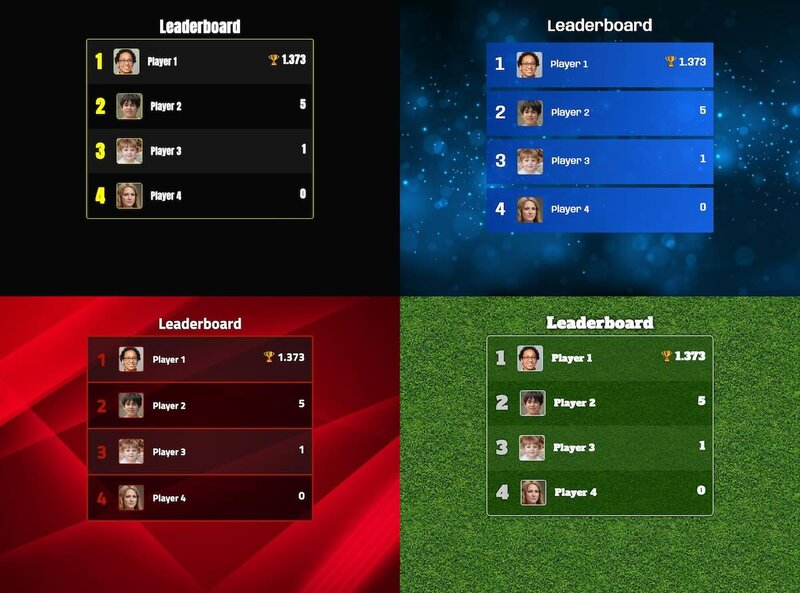
Free accounts support up to 25 participants. Paid plans unlock more participants, custom branding, and API access.
How to choose the right tool
The right leaderboard maker depends on your specific needs. Ask yourself:
- How many participants? Some tools limit free accounts to a handful. Check whether the free tier covers your group size.
- Where will the leaderboard be displayed? If you need TV display or website embedding, make sure the tool supports it.
- Do participants need to interact? Score submission features like scorekeeper links matter if you're not the only one updating the board.
- Do you need API access? For automated leaderboards connected to CRMs, LMS platforms, or fitness trackers, an API is essential.
- Does branding matter? If the leaderboard is client-facing or public, look for custom logos, colors, and theme options.
For a side-by-side comparison of leaderboard tools, see our comparison pages.
Live ranking examples
Leaderboards aren’t just for sales teams and classrooms. These public rankings are built with Leaderboarded and refresh automatically every week as the underlying data changes — a live look at what an always-up-to-date leaderboard looks like:
- Top True Crime Podcasts — the most popular true-crime shows, re-ranked every week.
- Top Sports Podcasts — live standings for the biggest sports podcasts.
- Top Tech Podcasts — the leading technology shows by popularity.
- Top Comedy Podcasts — the funniest podcasts, updated weekly.
- Top Rust Crates — the most-starred Rust crates on GitHub.
- Top React UI Libraries — React component libraries ranked by GitHub stars.
Try it free
Create your first leaderboard in under a minute. Free plan includes up to 25 participants.
Frequently asked questions
"What is an online leaderboard maker?"
An online leaderboard maker is a web-based tool that lets you create ranked leaderboards without coding. You add participants, enter scores, and share the leaderboard via a link or website embed. The tool handles sorting, ranking, and real-time updates automatically.
"Do I need coding skills to create a leaderboard?"
No. Online leaderboard makers are designed for non-technical users. You can create a leaderboard, add participants, enter scores, and share it without writing any code. Most tools also offer APIs for developers who want to integrate programmatically.
"Can I display a leaderboard on a TV or projector?"
Yes. Most online leaderboard makers generate a shareable URL that you can open in any browser. Open it in full-screen mode on a TV, projector, or monitor for a live display. Some tools offer dedicated TV display modes with auto-scrolling and larger fonts.
"Is there a leaderboard app?"
Most online leaderboard makers, including Leaderboarded, run as web apps — there is nothing to download or install. The leaderboard works in any browser on phones, tablets, computers, and TVs, and you can add it to your phone's home screen so it opens like a native app. Scores update live on every device.
"What is the difference between a leaderboard maker and a spreadsheet?"
A spreadsheet can store scores but requires manual formatting, formula setup, and sharing configuration. A leaderboard maker handles ranking, visual design, sharing, embedding, and real-time updates out of the box. It's purpose-built for the job that spreadsheets can only approximate.
"Is Leaderboarded free?"
Yes. You can create a leaderboard for free with up to 25 participants. Paid plans unlock more participants, custom branding, API access, and other features.