API - Manage Leaderboards and Trackers Programmatically
REST API documentation for Leaderboarded.com. Full CRUD operations for leaderboards, scoresheets, and goal trackers. Fetch data and update scores.
New here? Start with the quick start guide.
The API at /api/ lets you create, read, update and delete the following:
- Leaderboards - rank participants by score
- Scoresheets - track scores across multiple rounds
- Goal Trackers - monitor progress toward targets
What you can do with it
- Fetch all data for leaderboards, trackers, and counters
- Populate a leaderboard with participants, scores, and profile images
- Increment or set scores for individual participants
- Add a round with scores for everyone in one request
- Add participants (players or teams)
- Update participant names, images, and properties
- Delete participants, counters, or teams
- Customize board appearance (themes, colors, layouts)
Note: You can't create new boards via the API. Create the board on the website first, then drive it from your code.
API access
Each board has its own access token. That token is the key to everything.
Where to find your token
- Open your board and click Share in the toolbar
- Expand the Embed on a website section
- Copy the token from the API endpoint URL shown there
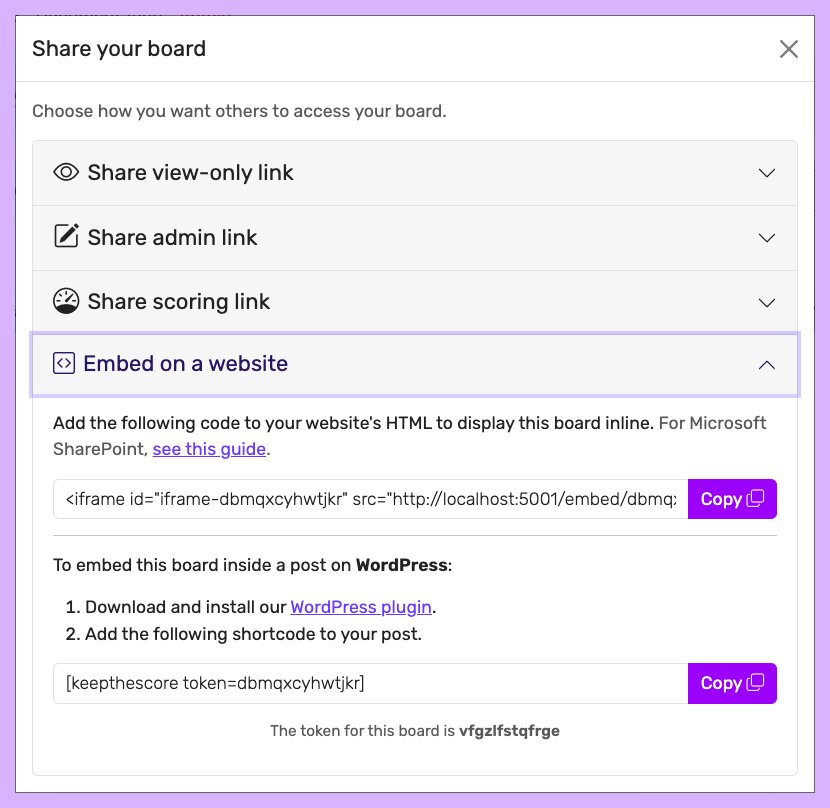 The access token sits in the "Embed on a website" section of the Share dialog
Using the token
Every request puts the token directly in the URL:
GET https://leaderboarded.com/api/{your_token}/board/
Same token, both reads and writes. It's scoped to that one board.
Working with player IDs
Most write operations need a player_id so the API knows which participant you mean.
How to find them
Step 1: Fetch the board to see everyone's IDs.
GET /api/{your_token}/board/
Step 2: Look for id in the response.
{
  "players": [
    {
      "id": 123,
      "name": "John Doe",
      "score": 50
    },
    {
      "id": 456,
      "name": "Jane Smith",
      "score": 75
    }
  ]
}
Step 3: Pass that id as player_id when you call other endpoints.
POST /api/{your_token}/score/
{
  "player_id": 123,
  "score": 10,
  "operation": "increment"
}
Quick example: bumping a score
# 1. Get all participants and their IDs
curl "https://leaderboarded.com/api/YOUR_TOKEN/board/"

# 2. Find the participant's ID in the response
# 3. Add 5 points to their score
curl -X POST "https://leaderboarded.com/api/YOUR_TOKEN/score/" \
  -H "Content-Type: application/json" \
  -d '{
    "player_id": 123,
    "score": 5,
    "operation": "increment"
  }'
Tip: Cache participant IDs in your app. You don't need to refetch the whole board every time you update a score.
Rate limiting
There's a rate limit so one user can't ruin it for everyone.
- Limit: 5 requests per second per board
- Cooldown: 1 minute if you go over
- Response code:
429(Too Many Requests)
Handle the 429 in your code with retry-and-backoff. It's not optional.
Fair use
We hardly ever step in. But if a board is being abused, we'll delete it without warning. Things that count as abuse: hammering the same request every second for days, automated traffic that serves no real purpose, or anything that looks like an attempt to overload us.
Got a real high-volume use case? Email us. We'll figure something out.
CORS
Every response sends access-control-allow-origin: *, so you can call the API straight from a browser.
Note: Watch the trailing slash on routes. A missing or extra
/will break the call.
API routes
Below is the full reference.
Note: "Participants" and "players" mean the same thing in the API.
Need help?
Questions, bug reports, feature requests, or feedback - email [email protected].
Related documentation
- Website Widget - embed your leaderboard on any site
- WordPress Integration - drop a leaderboard into WordPress
- Quick Start Guide - get going with Leaderboarded.com