Maths quiz with a leaderboard
Create engaging maths quizzes with competitive leaderboards. Turn mathematics practice into fun competitions that students love to participate in.
Article Contents

For a ready-to-use solution, try our classroom leaderboard which works perfectly for quiz competitions.
Nothing motivates students like seeing their name climb a leaderboard. Add a competitive element to your math quizzes and suddenly the same problems that felt like homework become a game worth winning.
This guide covers the complete workflow: finding good questions, setting up online forms for answers, and displaying results on a leaderboard that keeps students engaged.
The Three Steps
- Find questions from math puzzle sites, worksheets, or AI generators
- Create a form using Google Forms, Microsoft Forms, or similar
- Display results on a leaderboard that updates as you grade

Where to Find Good Questions
Math Puzzle Sites
Mathsisfun.com (mathsisfun.com/puzzles/number-puzzles-index.html) has puzzles organized by difficulty and concept. Good for finding problems that make students think rather than just calculate.
Example number puzzle suitable for intermediate students:
What is the missing number in Triangle Four?
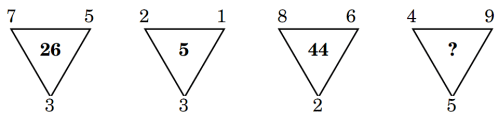
Solution methodology: Calculate the product of the two largest numbers minus the square of the smallest (45-16 = 29). This type of pattern recognition problem develops logical reasoning skills.
Commoncoresheets.com (commoncoresheets.com) has thousands of free worksheets organized by grade level. Pull individual problems or use complete sets.
Mathsbot.com (mathsbot.com) offers bell-ringers, manipulatives, and question generators. Useful for quick warm-up problems.
Using AI to Generate Questions
ChatGPT (chatgpt.com) can create custom problems if you specify the grade level, concept, and format. Just verify the solutions yourself—AI sometimes gets the math wrong, especially with multi-step problems.
Setting Up the Quiz Form
Any form tool works. Pick whichever your school already uses.
Google Forms (forms.google.com) auto-grades multiple choice and exports responses to a spreadsheet. No student login required.
Microsoft Forms (forms.office.com) has a built-in equation editor and integrates with Teams. Good if you're already in the Microsoft ecosystem.
Typeform (typeform.com) looks nicer but takes longer to set up. Worth it for special occasions.
Before sending the quiz, test it yourself. Enable response validation for numerical answers so students can't submit "twelve" when you need "12."
Displaying Results on a Leaderboard
 A quiz leaderboard from Leaderboarded.com
You could just read scores aloud, but that's forgettable. A spreadsheet works but looks dull. A proper leaderboard creates excitement.
Leaderboarded.com updates in real-time, works on any device (including interactive whiteboards), and adds animation when scores change. You can upload student photos, customize colors, and share a link with parents.
You can also connect Google Sheets directly if you want to manage scores in a spreadsheet while displaying them as a leaderboard.
Themed designs work well for seasonal events:
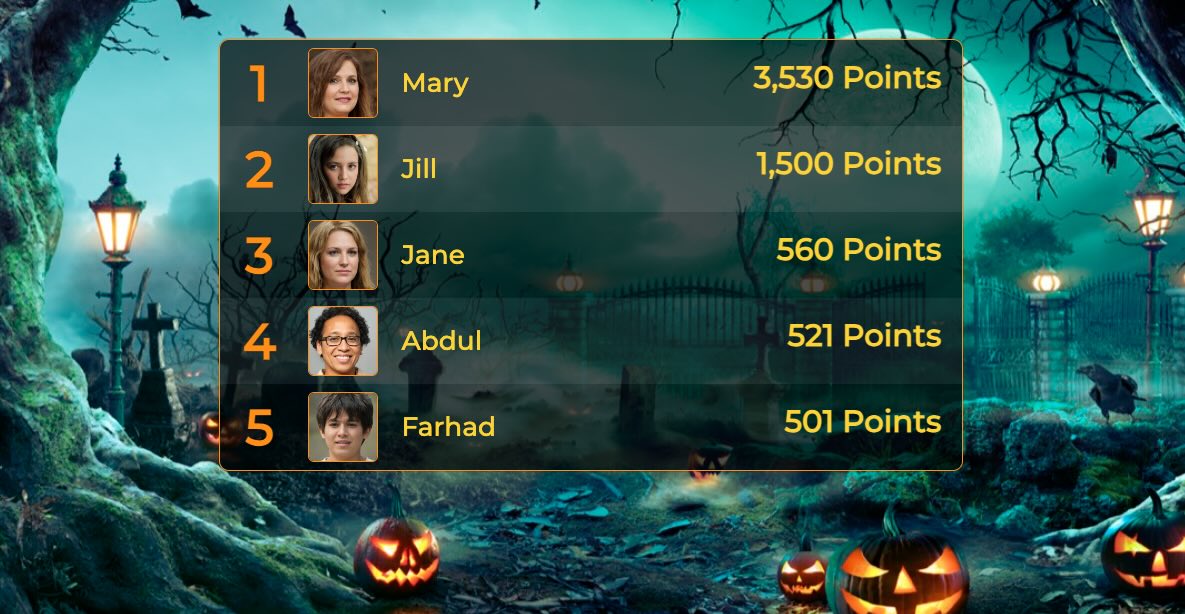 A halloween-themed leaderboard
Ideas to Try
Timed Challenges
Add a countdown using the classroom timer. Elementary students: 30-45 minutes. Middle school: 20-30 minutes. High school: 15-20 minutes.
Live Classroom Competitions
Project the leaderboard during class and update scores after each question round. The animation when rankings shift keeps students watching.
Student-Generated Quizzes
Assign quiz creation as homework. Students exchange quizzes and grade each other's work. Track both quiz quality and completion accuracy on a semester-long leaderboard.
Practical Tips
Test everything before class. Nothing kills momentum like a broken link.
Use initials or nicknames on public leaderboards if privacy is a concern.
Rotate between individual and team competitions—some students thrive on personal competition while others prefer working together.

Written by Caspar von Wrede
Founder of Leaderboarded. Building tools that help teams track progress and stay motivated.