Leaderboards: the quickest way to implement gamification
Online leaderboards are one of the simplest ways to add gamification to your team, class, or group. Here's how they work and when to use them.
Article Contents
Close Your Rings! Those words on the face of your Apple Watch might feel taunting, but they motivate millions of wearers to get up and move. How? By turning exercise into a game — one with badges, fireworks, and the satisfaction of a completed circle. It's surprising that it works. But that's the magic of gamification.
 Apple Watch with open rings
Gamification isn't just on our wrists. It's in daycare centers, school classrooms, sales floors, and corporate training programs. And for good reason: it works.
What is gamification?
Gamification is the use of game-design elements — points, badges, rankings, streaks — in contexts that aren't traditionally games. The goal is to make tasks more engaging by tapping into the same psychological drivers that make games compelling:
- Competence: Tracking measurable progress on clear goals makes people feel capable and effective
- Social connection: Leaderboards create comparison and collaboration, tapping into our need to belong
- Instant feedback: Immediate positive reinforcement makes each small win feel meaningful
- Loss aversion: Streaks and deadlines create urgency — nobody wants to break a 12-day streak
These drivers explain why the Apple Watch works, why Duolingo has 500 million users, and why a simple sales leaderboard can change the atmosphere of an entire team.
 Gamification works best when it channels a team's existing competitive energy
Where gamification is most effective
Not everything benefits from gamification. It works best where the activity is measurable, the participants can see each other's progress, and there's some element of choice (forced participation kills the effect).
In practice, it shines in four areas:
- Repetitive tasks: Making the tenth cold call of the day feel different from the first
- Team competitions: Giving distributed or remote teams a shared scoreboard to rally around
- Skill development: Tracking milestones while learning something new — progress is often invisible otherwise
- Customer engagement: Loyalty programs, challenges, and streaks that increase product interaction
 Tracking milestones makes skill-building visible
Why leaderboards are the fastest starting point
A leaderboard is simply a ranked list. It shows who's winning, where everyone else stands, and by how much. That's it. And that visibility alone is often enough to change behavior.
Pick the activity you want to gamify, decide how to measure it, and you have everything you need:
- A fitness trainer tracks how many workouts each participant completes per week
- A sales manager tracks how many leads each rep moves to the next pipeline stage
- A teacher tracks how often students submit homework on time
No points system, no badges, no tier levels required. Just a visible ranking. Add complexity later if it helps — but most teams don't need it.
What Gamification Looks Like Across All Active Boards
A quick aside on the data behind this. Leaderboarded hosts about 14,500 active boards across roughly 12,000 creators as of May 2026 — sales floors, classrooms, fitness challenges, hackathons, customer engagement programs, and a lot of niches you wouldn't predict. That's a fairly broad sample of real gamification in the wild, so it's worth showing what people actually pick.
The format mix across those active boards:
- A single ranked list — one cumulative score per participant: 72%. Median 8 participants. By a wide margin, this is what people land on after looking at more elaborate options.
- Round-by-round scoring (think quiz nights, leagues, multi-event tournaments): 12%. Median 7 participants, around 5–6 rounds per board on average.
- Several metric columns side by side: 7%. Median 8 participants. Sales floors and KPI dashboards live here.
- Team-based rankings that aggregate individuals: 4%. Larger by definition — median 14 participants.
- Progress thermometers toward a target (fundraising, sales-to-quota): 4%. Median 1, since these are usually one number per project.
A few patterns worth noting:
- Most working gamification setups are persistent, not event-based. About half the active boards have been running for 2 weeks to 2 months; another third for 2–6 months. One-time "single Friday afternoon" boards exist, but they're not where the engagement compounds.
- The complexity-versus-adoption tradeoff is brutal. Points systems with multipliers, badges, and unlockable rewards exist as features in the market, but most active boards look closer to a stripped-down ranked list. The teams that get the most out of gamification are usually the ones running the simplest version of it.
If you're choosing where to start: a single leaderboard with one metric, updated by one person, beats every elaborate alternative in the data. For the full data picture — persistence curves, sync vs async splits, and use-case breakdowns — see our workplace gamification deep-dive.
Setting up a leaderboard with Leaderboarded
Leaderboarded supports individual and team-based leaderboards. For individual tracking, the bar chart layout makes relative performance immediately obvious at a glance. The fastest way to start is to browse our leaderboard templates and pick a board that matches what you're gamifying.
 A bar chart leaderboard tracking contributions — each bar makes the gap between positions visible
For competitions where you want to track both individuals and their teams simultaneously, a team leaderboard shows both views at once.
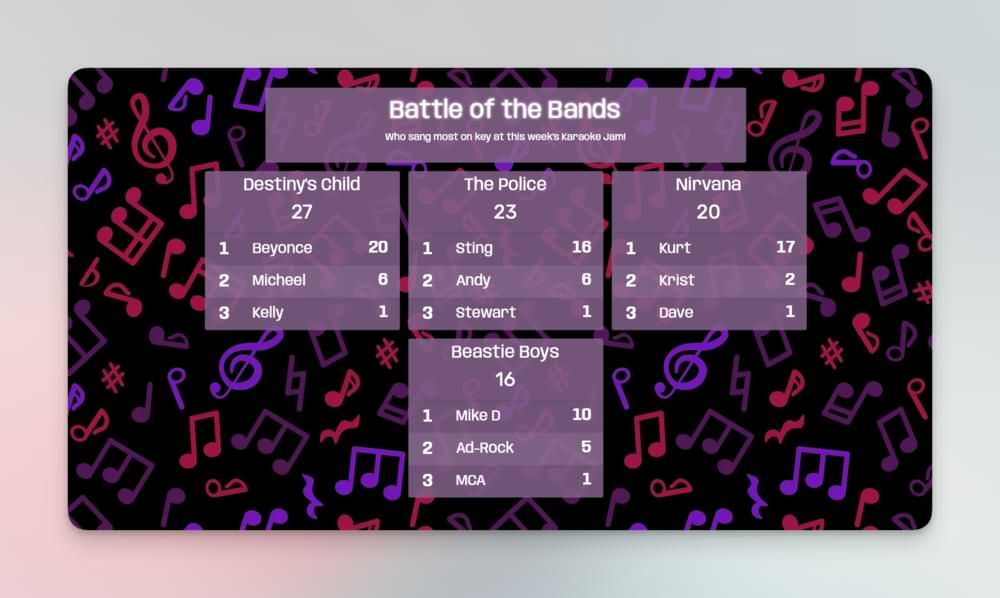 A team leaderboard — useful any time group performance matters alongside individual scores
Ready to add gamification to your team? Create a gamification leaderboard →
Capture Additional Participant Information
When adding or editing participants, you can optionally capture extra information like email addresses, organization names, and custom fields. This information:
- Is never visible on the public leaderboard
- Appears only in your admin view
- Is included when you download your data as CSV
- Perfect for lead generation at trade shows, contests, and events
Learn more: See our complete Participant Data Capture documentation for setup instructions, use cases, and privacy guidelines.
This feature requires activation. Contact us to get started or request additional custom fields.
Running a judged competition? The Competition Judging feature is designed for hackathons, talent shows, and events where multiple judges score participants independently.
Leaderboarded.com was previously a different product that shut down. We acquired the domain and relaunched it as a focused B2B leaderboard platform — read the story: how Leaderboarded.com was acquired and relaunched.

Written by Caspar von Wrede
Founder of Leaderboarded. Building tools that help teams track progress and stay motivated.