
The pitch from BoardQ is hard to ignore: $6.99/month for unlimited boards, an API, QR sharing, and ten-plus themes. That's roughly a third of Leaderboarded's entry price. So why pick Leaderboarded?
Short answer: because "leaderboard" isn't the only board you'll ever want, and because the BoardQ-vs-Leaderboarded price gap narrows fast — then flips — as soon as you need anything beyond a basic ranking.
What Is Leaderboarded?
Leaderboarded is a browser-based platform for creating real-time leaderboards, scoreboards, multi-column boards, team boards, and goal trackers. You create a board, add participants, share a link — anyone with the link sees live results.
Built for:
- Sales managers running team performance contests
- Teachers running classroom competitions and house-point systems
- Nonprofits displaying fundraising progress toward a goal
- Event organisers running multi-category competitions
- Streamers who want a live scoreboard in their OBS overlay
Setup takes a minute. Connect a Google Sheet and the leaderboard updates as the sheet changes. Use the REST API to push scores from another system. Embed the board on any website, share via QR code, or display it full-screen on a TV.
Pricing is flat. The Plus plan is $19/month (billed annually) for up to 20 boards and 100 participants. The Pro plan is $39/month for up to 200 boards and 1000 participants. The free tier covers 2 boards with 25 participants. See leaderboarded.com/pricing/.
What Is BoardQ?
BoardQ is an online leaderboard and scoreboard maker focused on speed and price. The pitch is "create and display leaderboards in seconds" with real-time score updates, QR-code sharing, and a REST API for automated scoring. The product reports 80,000+ leaderboards created, 500,000+ scores tracked, and a 30-second average setup time.
Built for:
- Teachers and educators running classroom rankings
- Event hosts and tournament organisers
- Sales managers running individual-rep contests
- Trivia and quiz hosts
- Anyone running a single live ranking
Three pricing tiers: Free (2 leaderboards, no custom logo, no API), Premium at $6.99/month (20 leaderboards, custom logo, API access, CSV/Excel export), and Enterprise at $129/month (200 leaderboards, multiple collaborators, custom themes, 24/7 support). See BoardQ's site for current details.
Feature Comparison
Board types
The biggest practical difference. BoardQ ships one product type: a leaderboard. Leaderboarded covers six board types on the same account:
- Leaderboard — running rankings, the default
- Scoreboard — fixed-participant boards with rounds (good for sport scoring)
- Multi-column board — events scored across several categories or judges
- Team board — individual scores roll up to team totals
- Goal tracker / fundraising thermometer — visual progress toward a target
- Registration board — sign-up + leaderboard combined for event participants
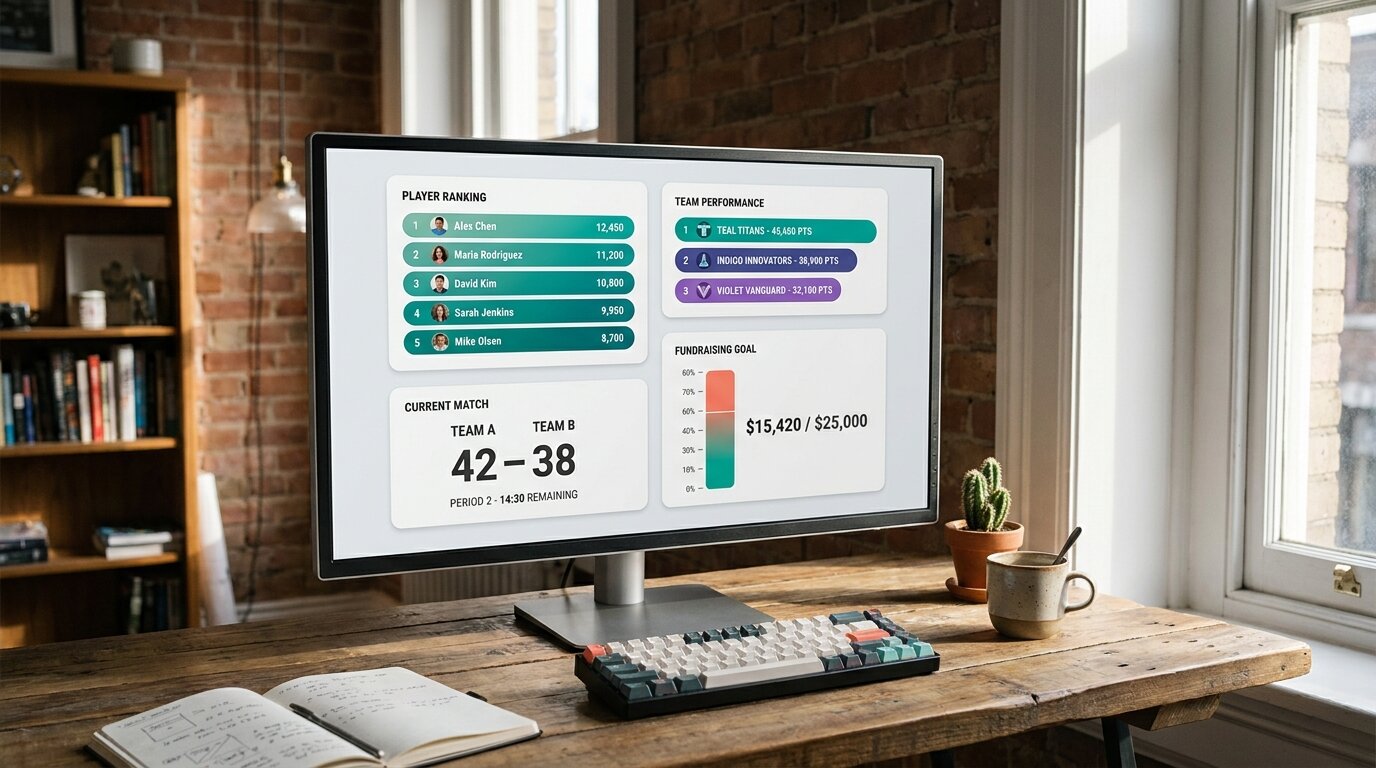
If you only need a leaderboard, this isn't a deciding factor. If you run multiple kinds of competitions — a sales contest in Q1, a step challenge in Q2, a classroom reading challenge in Q3, a fundraiser in Q4 — having the formats on one account is the whole game.
Team scoring
Leaderboarded supports team boards where each participant belongs to a team and individual scores aggregate to team totals automatically. Useful for classroom house points, sales team rollups, and relay-style competitions. BoardQ tracks individual rankings only — if you want "Team Red is ahead of Team Blue", you're either picking Leaderboarded or you're doing the math in a spreadsheet.
Google Sheets and data import

Leaderboarded connects to a Google Sheet for live sync — update the sheet, the leaderboard updates. Also supports CSV upload and a REST API.
BoardQ has an API and CSV/Excel export but no live Sheets sync. If your scores already live in a spreadsheet, the BoardQ workflow is "edit the sheet → re-export → re-import → push via API". On Leaderboarded it's "edit the sheet → done". For teams whose scores change daily, the difference matters.
REST API
Both tools have a REST API on paid plans. BoardQ exposes it at the $6.99/month Premium tier, which is the cheapest API access in this category. Leaderboarded exposes it on the $19/month Plus plan. If raw API-cost-per-month is the deciding factor, BoardQ wins. If you also want the API alongside Sheets sync, team boards, or goal trackers, BoardQ doesn't have those at any price.
Multiple collaborators / scorekeeper access
Leaderboarded includes a scorekeeper link across all paid plans — a separate link that lets someone enter scores without admin access. Useful for volunteer scorekeepers at events, classroom helpers, or distributed sales teams.
BoardQ gates "multiple collaborators" to the Enterprise tier at $129/month. The Premium plan ($6.99) doesn't include it. If your workflow involves anyone other than the account owner entering scores, the practical price comparison is Leaderboarded Plus ($19/mo) vs BoardQ Enterprise ($129/mo), not vs BoardQ Premium.
Goal trackers and fundraising thermometers
Leaderboarded includes goal tracker boards — visual thermometers that show progress toward a target. Common uses: fundraising campaigns, step challenges, reading goals, sales-quarter quotas. BoardQ has no equivalent. If you want a "$15k of $25k raised" visual alongside donor rankings, this is a one-vendor decision.
OBS streaming overlay
Leaderboarded boards can be loaded as a browser source in OBS or vMix for live streams. Stream a tournament, a charity broadcast, or a sales kickoff with the leaderboard rendered as a transparent overlay. BoardQ doesn't offer a documented OBS integration.
Embedding, QR codes, and TV displays
Both tools embed via iframe. Both generate QR codes for instant participant access. Both display full-screen on a TV, smart TV, or projector. Functionally parity on these — pick on the surrounding capabilities, not on these.
Themes and customisation
BoardQ ships ten named themes and allows custom CSS at the Premium tier. Leaderboarded ships dozens of themes and allows custom CSS on paid plans. Theme variety isn't a meaningful differentiator either way; both have enough.
Use Case Comparison
Which tool is better for a single basic leaderboard?
BoardQ, on price. If the entire job is one leaderboard, manually-entered scores, no team rollups, no spreadsheet sync, no goal tracker — BoardQ Premium at $6.99/month is the cheapest path. The savings vs Leaderboarded Plus are real ($13/month, $156/year).
Which tool is better for an ongoing portfolio of different boards?
Leaderboarded. The moment you're running more than one type of board — leaderboards plus a goal tracker plus a team competition plus a multi-judge event — BoardQ's leaderboard-only design forces workarounds. Leaderboarded covers all five formats on one account at $19/month.
Which tool is better for sales teams?
Leaderboarded. Sales leaderboards usually need team rollups, Google Sheets sync (or API push from a CRM via Zapier), and multiple people entering scores. BoardQ has the API but no team rollups, no sheet sync, and gates collaborators to the $129/month Enterprise tier. For sales-specific use cases, the right BoardQ tier ends up being Enterprise, and at that price the Leaderboarded Pro plan ($39/month) is dramatically cheaper.
For larger sales orgs running on a CRM, see the Spinify alternatives guide and the Plecto alternatives guide.
Which tool is better for classroom use?
Leaderboarded. Classroom competitions often need team boards (houses, table groups), goal trackers (class-wide reading goals), and a scorekeeper link for a classroom helper. Leaderboarded covers all three. BoardQ works for a simple class-wide individual ranking but doesn't have team rollups, goal trackers, or shared scorekeeper access on the affordable tier.
Which tool is better for fundraising?
Leaderboarded. The fundraising thermometer board is purpose-built. BoardQ has no equivalent.
Which tool is better for streamers?
Leaderboarded. The OBS overlay loads a transparent leaderboard directly into a stream. BoardQ doesn't offer a documented streaming integration.
Which tool is better at scale (100+ boards)?
Leaderboarded, on price. BoardQ's pricing has a steep step at the top: 20 boards on Premium ($6.99/mo) jumps to 200 boards on Enterprise ($129/mo). Leaderboarded's Pro plan is $39/month for 200 boards. If you're running an agency, an events business, or a multi-school district where you need 50+ boards, the Leaderboarded subscription is one-third of the cost.
Pricing
BoardQ has three tiers: Free (2 leaderboards, manual scoring, web embed, no custom logo, no API), Premium at $6.99/month (20 leaderboards, custom logo, API access, CSV/Excel export, email support), and Enterprise at $129/month (200 leaderboards, multiple collaborators, custom themes, 24/7 support). Confirm pricing directly on BoardQ's site.
Leaderboarded has three tiers: free (2 boards, 25 participants), Plus at $19/month billed annually (20 boards, 100 participants, all paid features including API, Sheets sync, scorekeeper link, custom branding), and Pro at $39/month billed annually (200 boards, 1000 participants). Full details at leaderboarded.com/pricing/.
The headline price gap ($6.99 vs $19) is the most striking number in this comparison. The less obvious part: it shrinks the moment you need multiple collaborators (Enterprise on BoardQ) or 100+ boards (also Enterprise on BoardQ), at which point the comparison is $129/month vs $39/month and the direction flips.
The Bottom Line
BoardQ is the cheapest credible leaderboard tool in this category. If the job is "one basic ranking, manually-entered scores, save $156/year vs the alternative", it's a defensible pick — and the QR-sharing and entry-tier API are real features at a real low price.
But cheap entry pricing pays off only if the entry tier covers the job. Three things will break the deal: needing more than one type of board, needing multiple people to enter scores, or growing past 20 boards. The first is structural (BoardQ doesn't offer team boards, goal trackers, multi-column boards, or sheet sync at any price). The second and third both force the jump to BoardQ Enterprise at $129/month — at which point Leaderboarded Pro ($39/month) does the same job for less than a third of the cost.
Pick BoardQ for the single straight leaderboard at the lowest possible price. Pick Leaderboarded when the leaderboard is one of several boards you'll run, or when scorekeeping is a team activity, or when the portfolio gets large enough that the cheap entry tier no longer covers it.
Still shopping? See the best online leaderboard maker tools guide for the full landscape, or compare Leaderboarded to Scoreleader, LeaderboardHQ, Spinify, Plecto, and SalesScreen. Browse all comparisons or see the full leaderboard software comparison.
Feature Comparison
| Feature | Leaderboarded | BoardQ |
|---|---|---|
| What it is | Browser-based platform for leaderboards, scoreboards, multi-column boards, team boards, and goal trackers | Online leaderboard and scoreboard creation tool with QR sharing and a REST API |
| Who is it for | Sales teams, classrooms, events, nonprofits, streamers, and anyone running an ongoing ranking | Teachers, event hosts, tournament organisers, sales managers, and trivia hosts running individual leaderboards |
| Core capability | Multiple board types with team scoring, Google Sheets sync, API, and website embedding | Individual leaderboards with real-time updates, QR sharing, and API integration |
| Entry-paid pricing | $19/mo (Plus) | $6.99/mo (Premium) |
| Top-tier pricing | $39/mo (Pro) | $129/mo (Enterprise) |
| Free tier available | Yes (2 boards, 25 participants) | Yes (2 leaderboards, unlimited scores, no custom logo, no API) |
| Board types offered | Leaderboard, scoreboard, multi-column, team board, goal tracker / fundraising thermometer, registration board | Leaderboard |
| Team boards (scores roll up to team totals) | ✓ | ✗ |
| Goal tracker / fundraising thermometer | ✓ | ✗ |
| Multi-column / multi-judge boards | ✓ | ✗ |
| Google Sheets live sync | ✓ | ✗ |
| REST API | Yes (paid plans) | Yes (Premium and above) |
| OBS streaming overlay | ✓ | ✗ |
| QR code sharing | ✓ | ✓ |
| Embed on website | Yes (iframe) | Yes (iframe) |
| Custom logo and colors | Yes (paid) | Yes (Premium and above) |
| Custom CSS | Yes (paid) | ✓ |
| Multiple collaborators / scorekeeper access | Yes ([scorekeeper link](/docs/how-to-share/), all paid plans) | Enterprise only ($129/mo) |
| CSV / Excel export | ✓ | Yes (paid) |
| Full-screen / TV display | ✓ | ✓ |
| Mobile app | No (mobile-responsive web) | No (mobile-responsive web) |
| Localisation | English, German, Spanish, Portuguese, Italian | English only |
| GDPR compliant / EU data | ✓ | Unknown |
Which One Should You Choose?
Choose BoardQ if...
- You only need a basic leaderboard — no team rollups, no goal trackers, no spreadsheet sync
- Entry-paid price is the deciding factor and $13/month matters
- Score entry is mostly manual and you don't need a Google Sheets connection
- You're running a single leaderboard, not a portfolio of different board types
Choose Leaderboarded if...
- You need more than one board type — leaderboards, scoreboards, team boards, goal trackers, multi-column boards
- You want team boards where individual scores roll up to group totals
- You need a [goal tracker or fundraising thermometer](/fundraising-thermometer/)
- Your scores live in a Google Sheet and you want live sync, not periodic CSV uploads
- You're a streamer and need an [OBS overlay](/docs/streaming-software/)
- You want collaborators / a [scorekeeper link](/docs/how-to-share/) included on the entry-paid tier, not gated to Enterprise
- You're running a sales contest and want a [dedicated sales leaderboard page](/sales-leaderboard/), not a generic board
- You expect to scale past 20 boards — Leaderboarded Pro is $39/mo for 200 boards vs BoardQ Enterprise at $129/mo
Frequently Asked Questions
"Is Leaderboarded a direct replacement for BoardQ?"
For the core 'create a leaderboard and share a link' job, yes — both tools do that, both have free tiers, both have a REST API and QR sharing. Leaderboarded covers a wider surface area: team boards with rollup totals, goal trackers and fundraising thermometers, multi-column boards for events with several metrics or judges, Google Sheets live sync, and an OBS streaming overlay. BoardQ stays focused on leaderboards and doesn't offer any of those.
"BoardQ is cheaper at $6.99/month. Is it worth $13 more for Leaderboarded?"
Depends on what you need. If a single straight leaderboard is the whole job, BoardQ Premium covers it at $6.99/mo and the savings are real. If you also need team rollups, goal trackers, sheet sync, or you're running more than one type of board, the price difference pays for itself the first time you'd have had to build those workflows manually. The math also flips at the top tier — Leaderboarded Pro is $39/mo for 200 boards vs BoardQ Enterprise at $129/mo.
"Does BoardQ have Google Sheets integration?"
Not as a live sync. BoardQ supports CSV and Excel export (on paid plans) and a REST API for pushing scores from any system. Leaderboarded connects to a Google Sheet directly — update the sheet, the leaderboard updates. For teams whose scores already live in a spreadsheet, the live-sync route saves a re-import every time numbers change.
"Does BoardQ support team boards or rollup scoring?"
No. BoardQ tracks individual rankings on a single leaderboard. Leaderboarded supports team boards where each participant belongs to a team and individual scores aggregate to team totals automatically — useful for classroom house points, sales team rollups, and relay-style competitions.
"Can I have multiple people enter scores with both tools?"
Yes on Leaderboarded across all paid plans — a scorekeeper link gives someone score-entry access without admin permissions. BoardQ gates this behind Enterprise ($129/mo); the Premium tier doesn't include multiple collaborators. If you need a volunteer scorekeeper at events, a team lead updating their pod's numbers, or a teacher's assistant entering classroom points, that's a meaningful gap on BoardQ's cheaper tier.
"Which tool is better for sales teams?"
Leaderboarded. Sales leaderboards usually need team rollups, Google Sheets sync (or API push from a CRM via Zapier), and multiple scorekeepers updating numbers. Leaderboarded covers that workflow on the entry-paid tier. BoardQ handles individual rankings well but doesn't have team rollups or sheet sync, and collaborators are Enterprise-only. For larger sales orgs running on a CRM, see the Spinify alternatives guide and the Plecto alternatives guide.
"Which tool is better for fundraising or progress tracking?"
Leaderboarded. The fundraising thermometer board is purpose-built: visual progress toward a target, optional team breakdown, a public link to share with donors. BoardQ has no equivalent — it's a leaderboard tool, not a goal-tracker tool.
"Can I try Leaderboarded before paying?"
Yes. The free tier includes 2 boards with 25 participants each — no credit card required, no Leaderboarded branding on the board. See leaderboarded.com/pricing/ for plan details.
Try Leaderboarded Today
Pick from leaderboards, scoreboards, team boards, multi-column boards, or goal trackers. Flat $19/month — all paid features included, no Enterprise-only gates. Start with the free tier.
Information about BoardQ was accurate as of May 2026. Visit https://www.boardq.io for latest details.