Donation Leaderboard: Rank Donors and Track Fundraising Live
Set up a donation leaderboard that ranks donors in real time — a digital donor wall for galas, school drives, and multi-week fundraising campaigns.
Article Contents
A donation leaderboard ranks donors or teams in real time so everyone can see who's contributing and how the campaign is progressing. Whether you're running a charity leaderboard for a gala, a school donation leaderboard for a book drive, or a corporate giving challenge — the principle is the same: people give more when they can see the scoreboard. Call it a fundraising leaderboard, a donor leaderboard, or a digital donor wall — the mechanics are identical.
Metallica's fan club runs a good example: their chapter fundraising campaigns use a leaderboard where chapters compete to raise the most for charity.
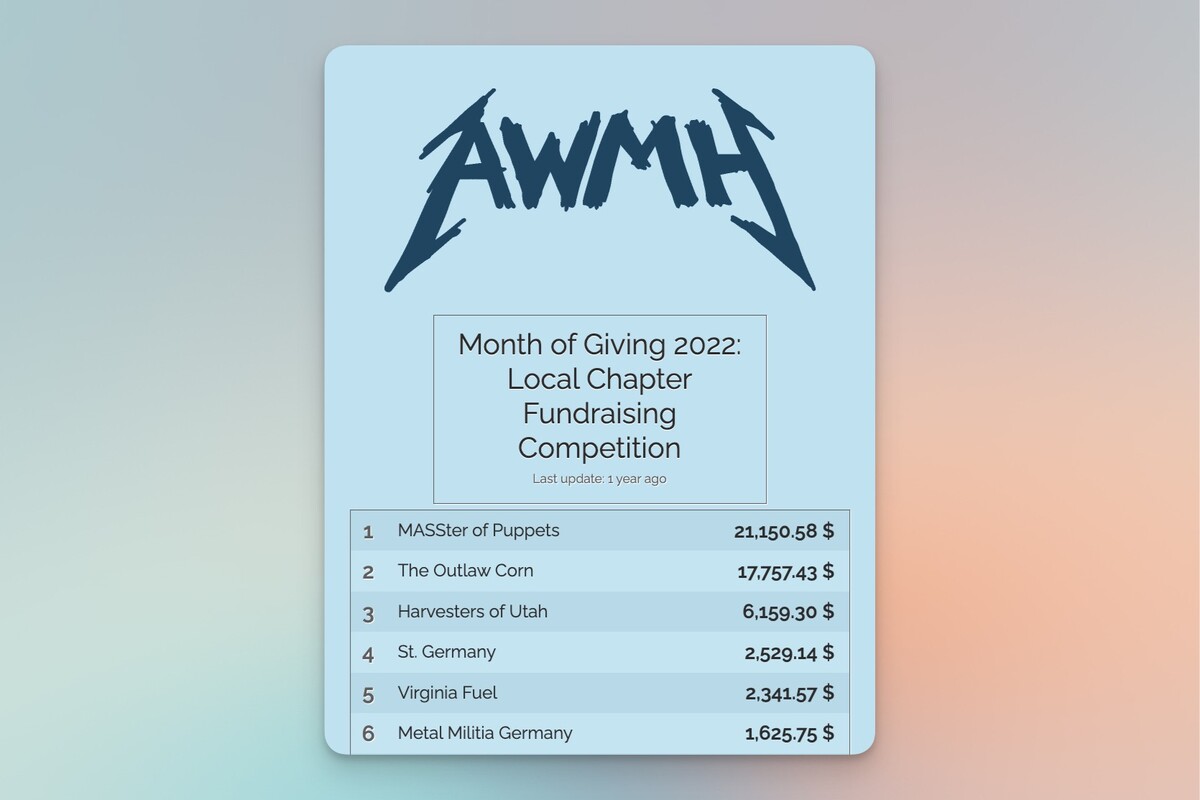 A fundraising leaderboard created by a Metallica fan-club
Why Donor Rankings Drive More Giving
Public visibility changes behavior. When donors see their name on a ranked list, they're more likely to give again — and give more. A study by the National Bureau of Economic Research found that making donation amounts visible significantly increased both the frequency and size of contributions.
Leaderboards also make it easy to share progress on social media, which pulls in new donors who might not have heard about the campaign. The mid-campaign slump is real for most fundraisers — regular movement on the board keeps volunteers and donors engaged when momentum would otherwise stall.
A Digital Donor Wall That Updates Itself
Traditional donor walls — the engraved plaques in hospital lobbies and university halls — serve a purpose, but they're static and expensive to update. A digital donor wall does the same job in real time: recognize contributors publicly and motivate others to give.
The difference is speed. When someone donates at a gala, their name appears on the leaderboard within seconds. That instant recognition creates a feedback loop: other guests see the board updating, feel the momentum, and reach for their wallets. Physical donor walls can't do that.
 A digital donor wall built with Leaderboarded.com
A digital fundraising leaderboard works well for:
- Charity galas and auctions — display on a projector or TV screen so the room can watch donations climb
- Multi-week campaigns — embed on your website so donors can check progress anytime
- Peer-to-peer fundraising — rank individual fundraisers or teams competing to raise the most
- Church and school drives — share a link in newsletters and on social media
How to Rank Donors
Not all donor rankings work the same way. The right approach depends on your campaign and your donors' expectations.
By Total Amount
The default: rank donors from highest to lowest contribution. This works for campaigns where large gifts matter and donors are comfortable with public amounts. Charity auctions, capital campaigns, and corporate giving challenges all benefit from this format.
By Number of Donations
Some campaigns care more about participation than dollar amounts. Ranking by donation count rewards consistent givers — the person who donates $10 every week gets recognized alongside major donors. This works particularly well for recurring giving campaigns and community drives where broad participation matters more than individual gift size.
Team-Based Rankings
Instead of ranking individuals, group donors into teams — by department, class year, geographic region, or any other grouping. Team rankings reduce the pressure of individual comparison while still creating competition. Schools often use this for grade-level fundraising competitions.
Tiered Recognition
Rather than showing exact amounts, group donors into tiers: Gold ($1,000+), Silver ($500+), Bronze ($100+). This provides recognition without exposing precise numbers, which some donors prefer. You can set this up by using score ranges and custom labels in your leaderboard settings.
Pledge Campaigns: Track Commitments, Not Just Donations
A donation leaderboard tracks money received. A pledge campaign works differently — people commit to giving in advance, and you track fulfillment as they follow through.
This matters because pledge drives often stall quietly. Someone promises $500 at a school fundraiser, then forgets. A leaderboard that shows pledged vs. collected amounts creates gentle accountability — pledgers see their name with an outstanding balance, and the social pressure does what reminder emails can't.
Real examples from campaigns running on Leaderboarded:
- Kahn Elementary School Christmas Blanket Drive — families pledged blankets by grade level, with a class leaderboard tracking who delivered
- Animation Crowdfund Supporters — backers pledged at different tiers, with a live donor wall showing progress toward the production budget
- Road to 100,000 Books Sold — a book readathon where participants pledged reading goals and logged progress on a public tracker
- Donations to Montana TPUSA Clubs — chapter-based fundraising with a leaderboard ranking each club's total raised
For pledge-specific tracking, you can use a fundraising thermometer to show overall progress toward your target, or a custom pledge counter if you want a more interactive display. The leaderboard approach works best when you want to rank individual pledgers or teams — which drives competition and faster fulfillment.
Privacy Considerations
Not everyone wants their donation amount — or even their name — displayed publicly. Handle this before your campaign launches, not after someone complains.
- Offer an anonymous option. Let donors opt out of public display when they give.
- Show names without amounts. Some donors are fine being listed but don't want their specific contribution visible. You can configure your leaderboard to show rankings without revealing scores.
- Set a visibility threshold. Only display donors above a certain amount, or only show the top 10.
The key is deciding your privacy policy upfront and communicating it clearly. "Your name and donation amount will appear on our public leaderboard unless you choose to donate anonymously" — simple and transparent.
Setting Up Your Donation Leaderboard
Create your leaderboard, add donors or teams, then configure the currency and goal amount in Settings. Enable the overall total display so visitors can see campaign progress at a glance. Once set up, grab your presentation link to share via email, social media, or embed on your campaign website.
At an in-person fundraiser, you can even let donors or teams add themselves with QR code sign-up — they scan a code and join the board in seconds.
Capture Additional Participant Information
When adding or editing participants, you can optionally capture extra information like email addresses, organization names, and custom fields. This information:
- Is never visible on the public leaderboard
- Appears only in your admin view
- Is included when you download your data as CSV
- Perfect for lead generation at trade shows, contests, and events
Learn more: See our complete Participant Data Capture documentation for setup instructions, use cases, and privacy guidelines.
This feature requires activation. Contact us to get started or request additional custom fields.
For WordPress sites there's a dedicated plugin. For other platforms, paste the iframe embed code. The leaderboard updates automatically whenever you add or change donations — no manual refreshing needed on the viewer's end.
Running a gala or live auction event?
If the campaign is happening as an event — a gala with an auctioneer, paddle numbers, table sponsors, and a run of show — the scoreboard becomes part of the production. The auctioneer wants to call out specific gift levels, the MC wants paddle-number rankings on screen, and the lead-gift wall has to feel as polished as the venue.
For event-night builds like that, see our custom event scoreboards — fully branded, sponsor strip optional, built around the auction night and on-call from cocktails to last call.
If You Just Need a Total
Not every campaign needs individual rankings. If you just want to show "we've raised $X out of $Y," a fundraising thermometer is simpler and takes up less screen space — it works especially well on campaign websites and email updates where a single visual tells the whole story.
For goal-based campaigns, a fundraising goal tracker lets you set a target amount and show a progress bar filling up. It's the right choice when the focus is collective progress rather than who gave what. See our donation tracker guide for a full comparison of tracking options.
Customization
Match the leaderboard to your brand with colors, logos, and fonts. Browse the theme gallery for options.

For large venue displays, you can customize what's shown using URL parameters — hide the search box, enable auto-scrolling, or filter by rank. See the display customization guide for details.
Campaign Ideas
Looking for themed campaign inspiration? We've written specific guides for:

Written by Caspar von Wrede
Founder of Leaderboarded. Building tools that help teams track progress and stay motivated.