Quick Join: QR Code Sign-Up for Your Leaderboard
Let event participants add themselves to your leaderboard by scanning a QR code — no account needed, and you keep full control of all scoring.
Quick Join is rolling out gradually and is not enabled by default. To switch it on for your account, contact us and we'll enable it within 24 hours.
Run an event and want everyone on the board without typing in name after name? Quick Join lets participants add themselves by scanning a QR code. They put in their own name (and any fields you choose) — and that's all they can do. You keep complete control of every score.
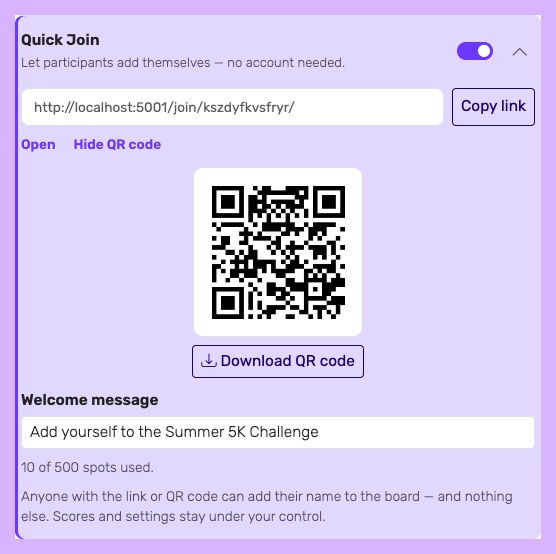
Turn on Quick Join in the Share dialog, then show or print the QR code
What is Quick Join?
Quick Join is the fastest way to build a participant list at an in-person event. Instead of collecting names beforehand or typing them in yourself, you display a QR code and people add themselves in about fifteen seconds.
What makes Quick Join different:
- No account required — participants never sign up, log in, or create a password. They just enter a name.
- You keep all scoring — a participant can only add their own row. They can't change scores, edit other people, or see your settings.
- Instant and live — new names appear on your admin board and on the projector immediately.
How Quick Join works
The flow has two sides — you set it up once, then participants do the rest.
For you, the organiser:
- Open your leaderboard and click Share.
- Turn on the Quick Join switch and (optionally) write a short welcome message.
- Show the QR code on a screen, or download and print it for your check-in table.
For each participant:
- They scan the QR code with their phone camera — no app to install.
- They enter their name, plus any fields you've enabled (such as a team name).
- They tap Add me to the leaderboard and they're on the board.
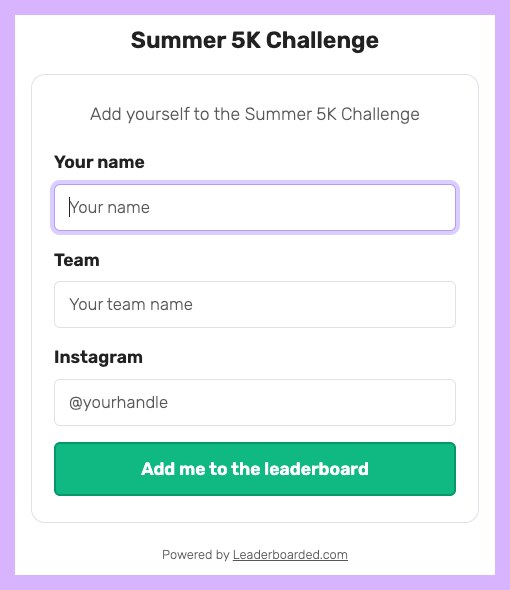
What participants see after scanning — a simple form, no account, no app
How to enable Quick Join
- Contact us to activate Quick Join for your account.
- Open your leaderboard and click Share.
- Flip the Quick Join switch on. Copy the join link, or use Show QR code to display and download the code.
- To stop new sign-ups at any time, flip the switch back off — the join page immediately shows that joining is closed.
What participants see, and what stays private
Participants only ever see the join form and, after joining, the public leaderboard. They cannot see your settings or anyone else's hidden details.
You can collect extra fields on the join form — for example a team name (shown as a second line on the board) or an Instagram handle (kept private). Any field you mark as hidden through Participant data capture is never shown on the public leaderboard — it's visible only to you and included in your CSV export.
Participant limits
The number of people who can join is set by your plan, not by Quick Join:
- Free: up to 25 participants per board
- Plus: up to 100 participants per board
- Pro: up to 1000 participants per board
For a large event, make sure your plan's limit comfortably covers the crowd you expect. When the board is full, the join page tells participants to find the organiser instead of failing silently.
Great for events
Quick Join shines anywhere people gather and you want them on the board fast:
- Tournaments and leagues — let players register themselves at check-in. See running a gaming tournament leaderboard and hackathon leaderboards.
- Trade shows and booths — turn booth visitors into a live competition without manual data entry. See trade show leaderboards.
- Fundraisers and team challenges — get donors or teams onto the board in seconds. See fundraising leaderboards.
Getting started
Contact us to activate Quick Join for your account.