What are the different tools on Leaderboarded?
Create customizable leaderboards, scoresheets, and trackers for competitions, contests, and events. Choose the right tool for your needs.
Quick Decision Guide:
- Competition or contest? → Choose a Leaderboard
- Multiple rounds or events? → Choose a Scoresheet
- Team competitions? → Choose a Team Leaderboard
- Multiple metrics per participant? → Choose a Multi-Column Leaderboard
- Upload from Excel? → Choose Spreadsheet Import
- Scores already in Google Sheets? → Choose Google Sheets
- Working toward a target? → Choose a Goal Tracker
- Counting down to or timing an event? → Choose a Timer
Leaderboards
Track and rank participants by score. Our most popular tool, available in 4 different types:
Perfect for: Competitions, contests, classrooms, and rankings
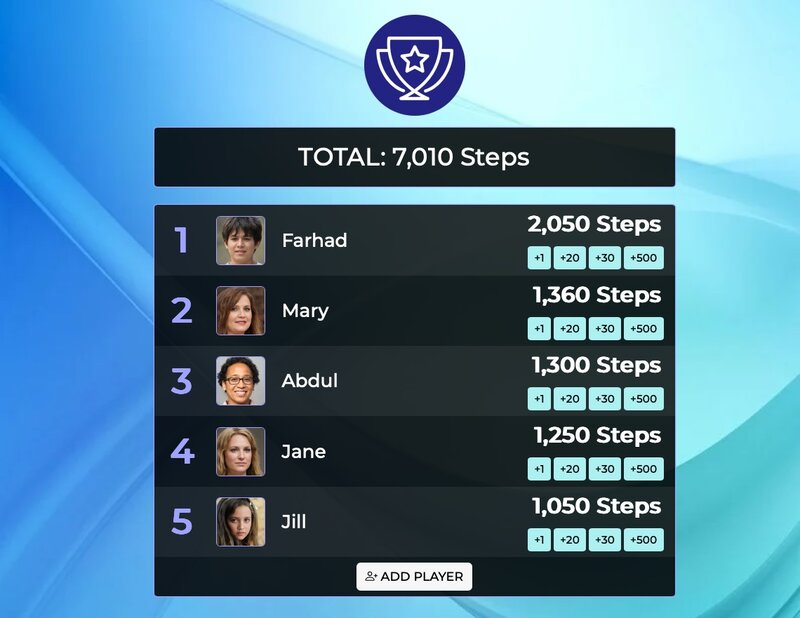
Key Features:
- Dynamic Rank Styles: Highlight top performers with custom colors and emojis (🥇🥈🥉)
- Multiple Layout Options: Choose from Table, Compact, Columns, or Bar Chart layouts
- Flexible Sorting: Rank by highest or lowest scores
Available Layouts:
- Table: Traditional row-based layout with rank, name, and score columns
- Compact: Space-efficient cards showing essential information
- Columns: Multi-column layout for better use of horizontal space
- Bar Chart: Animated horizontal bars for visual impact (great for presentations)
💡 Bar Chart Layout: Perfect for live quizzes, trivia nights, and engaging presentations. Create dramatic reveals with animated score updates.
💡 Running an event? Let participants add themselves to a leaderboard by scanning a QR code with Quick Join — no account, and you keep control of all scoring.
Scoresheets
Track scores across multiple rounds with automatic totals. Perfect for tournaments and leagues.
Perfect for: Tournament brackets, multi-event competitions, weekly league matches, progress tracking over time
💡 Need elimination brackets? Our tournament bracket maker generates single and double elimination brackets for office competitions, trivia nights, and team events.

Key Features:
- Round-by-round scoring: Track performance across multiple events
- Automatic total calculation: Running totals update automatically
- Dynamic rank styles: Highlight winners with custom colors and emojis (🥇🥈🥉)
- Historical performance view: See progress over time
Team Leaderboards
Track both individual and team performance on one page. Group participants into teams with individual and team totals.
Perfect for: Team competitions where you need both individual and team tracking
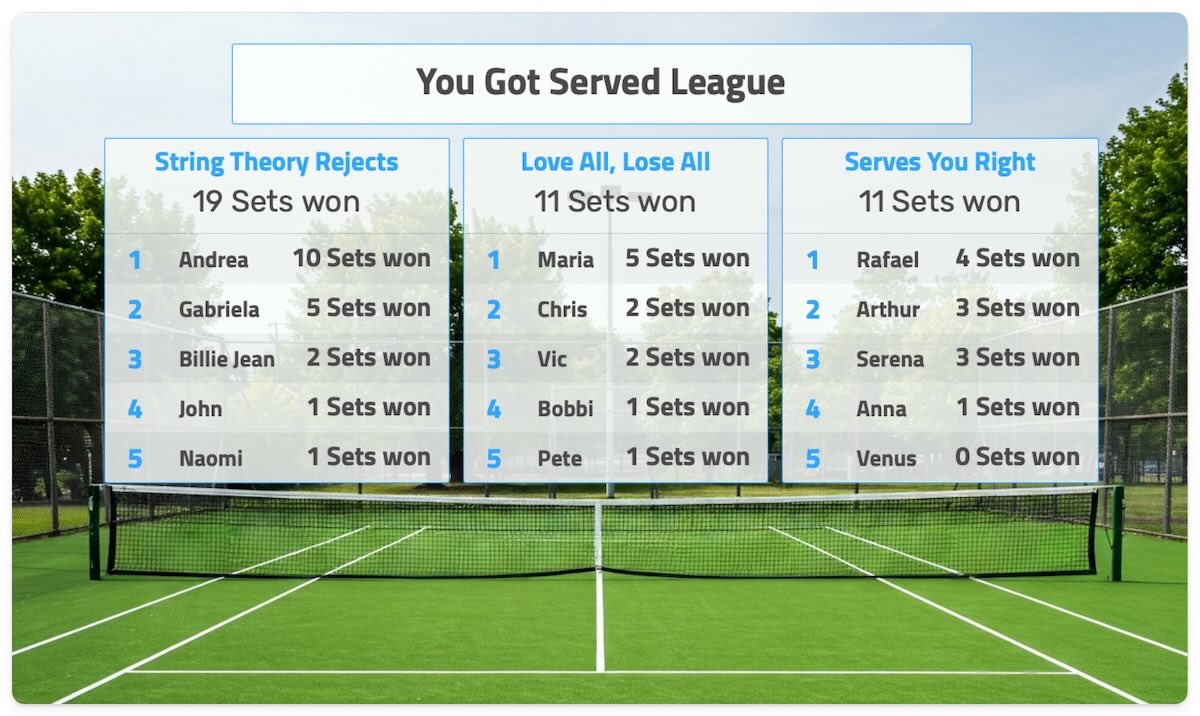
Key Features:
- Individual member tracking: See performance of each team member
- Automatic team totals: Team scores calculate automatically
- Team-only scoring: Add bonuses/penalties directly to teams
- Dynamic rank styles per team: Custom colors and emojis for each team
💡 When to use: Multiple members per team with both individual and team tracking needed. For single-member teams or team-only scores, use a standard leaderboard.
Multi-Column Leaderboards
Track multiple metrics per participant. Ideal for leagues and tournaments with complex scoring.
Perfect for: Team standings (wins/losses/ties), sales teams (revenue/orders/conversion), gaming leagues (kills/deaths/assists)

Key Features
- Multiple score columns: Track as many metrics as you need per participant
- Automatic Total column: Enable in Settings > Engagement to show the sum of all columns for each row
- Per-column sorting: Choose which column determines ranking
- Flexible formats: Each column can use integers or decimals independently
Spreadsheet Import
Upload Excel files to create leaderboards. Supports multiple score columns per participant.
Perfect for: Complex calculations, bulk updates, maintaining scores in external spreadsheets
Key Features:
- Excel file upload: Update scores by uploading spreadsheet files
- Multiple columns support: Import multiple metrics per participant
- Custom CSS styling: Customize appearance with CSS in Settings
- Bulk updates: Update many participants at once
Google Sheets
Connect a Google Sheet and your leaderboard auto-syncs whenever the sheet changes — no manual re-entry. Keep editing scores where your team already works, and the board stays up to date.
Perfect for: Teams who already keep scores in a spreadsheet, recurring competitions, and semi-automated updates
Key Features
- Live sync from your sheet: Edit the spreadsheet and the leaderboard follows
- Multiple score columns: Bring across several metrics per participant
- No manual entry: Your sheet stays the single source of truth
- Shareable and embeddable: Display the synced board on a screen or your website
See the full Google Sheets guide for the exact sheet format and step-by-step setup.
Goal Trackers
Visualize progress toward any target. Show progress towards a fundraising or other goal.
Perfect for: Fundraising thermometers, sales targets, fitness goals, project milestones
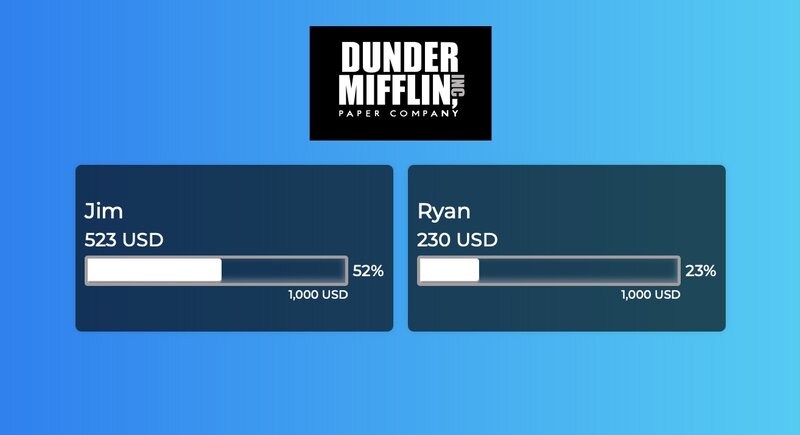
Key Features:
- Visual progress bars: Motivating visual representation of progress
- Target tracking: Set and track progress toward specific goals
- Customizable displays: Multiple visual styles and themes
- Real-time updates: Progress updates automatically
Timer
A synced countdown, game clock, or stopwatch you control from your phone while it shows full-screen on any number of screens — a projector, a TV, a laptop. Start, pause, and add time from anywhere in the room, and every screen follows to the second.
Perfect for: Events and conferences, classrooms and exams, meetings, stage and presentation timing, and "starting soon" hold screens
Key Features
- Live multi-screen sync: One link shows the same countdown on every screen at once
- Phone remote control: Run it from the back of the room — no app to install
- Count down or up: Count down to a hard stop, or use it as a stopwatch
- Scheduled start, buzzer, and end message: Count down to a set time and finish with a buzzer plus an on-screen message
See the full event timer guide for displaying it on a screen and controlling it from your phone.